Printable centering ruler
Print it on clear film, lay it on your card, and read each border's width straight off the scale. Then type the four numbers into the calculator.
On this page
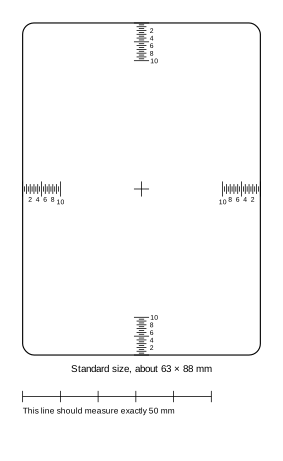
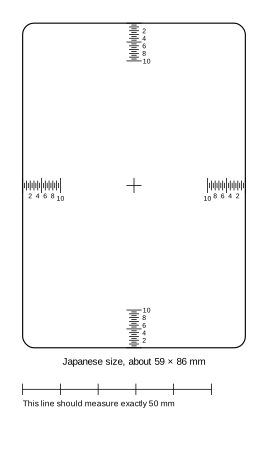
Print it at actual size
A ruler is only as good as its print. Browsers and printers like to shrink pages to fit, which would make every millimetre on the scale a little short.
- In the print dialog, set the scale to 100% or actual size, and turn off "fit to page".
- After printing, measure the check bar under each card with a real ruler. It should be exactly 50 mm. If it isn't, the print was scaled: fix the setting and print again.
Clear film or paper?
Clear film (laser or inkjet transparency sheets, matched to your printer) is best: you lay the whole outline over the card, line up the edges, and read every border at once without touching the card's surface.
Paper works too. Cut along the card outline and use each edge as a little ruler: hold the cut edge against the card's edge, and read where the border ends on the scale.
How to read it
- Put the card in a penny sleeve to protect it, and lay it on a dark, flat surface.
- Lay the overlay on top and line its outline up with the card's edges. The small cross marks the middle of the card.
- On each of the four scales, read where the card's printed border ends. Each tick is half a millimetre; the long ticks are whole millimetres, numbered every 2 mm, and the longest mark every 5 mm.
- Write down the four widths, then do the back.
- Type them into the centering calculator to see the ratios and each grading company's limit.
How precise is it?
A printed tick is a few tenths of a millimetre wide, and your eye has to judge where a border ends against it. Expect to read each border to about a quarter of a millimetre. On a card whose borders add up to around 5 mm, that's a few points of ratio either way.
That's plenty to sort a stack of cards into "clearly centered", "clearly not" and "worth a closer look". For a card in that last pile, near a limit like 55/45, measure with calipers or check it from a photo, which places the border's edge more finely than a printed scale can.
Which size do I need?
- Standard size, about 63 × 88 mm: Pokémon, One Piece, Riftbound, Magic: The Gathering, Disney Lorcana and most other trading card games.
- Japanese size, about 59 × 86 mm: Yu-Gi-Oh! and other small-format cards.
Not sure? Measure your card's width. If it's nearer 63 mm, use the standard one.
Free to print and share for personal use. Preslab is not affiliated with any grading company or card publisher.
Photograph the front and back. Preslab measures the centering and shows how high PSA, TAG, BGS, CGC and ACE let it grade. Free, and centering only.